
Download TeX Equation Editor – LaTeX, Mathematical Formula, Google Docs
Overview
The TeX Equation Editor is a specialized desktop application designed to generate high-quality images of mathematical formulas using the TeX or LaTeX language. It serves as a practical tool for educators, students, researchers, and content creators who need to visually present complex equations in digital formats. By leveraging the Google Mathematical Formulas API, the software converts written mathematical expressions into clean, professional-grade images suitable for web pages, blogs, forums, and documents.
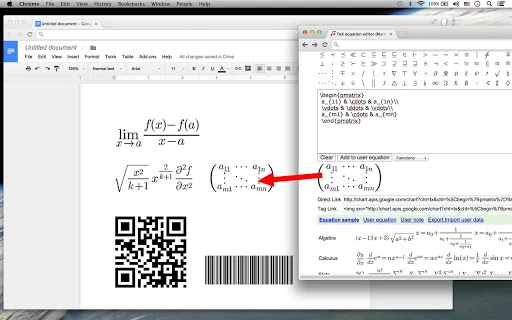
The application supports seamless integration with Google Drive, enabling users to directly paste generated equations into Google Docs or other cloud-based platforms. This functionality is particularly beneficial for collaborative academic work or online teaching environments. Real-world use cases include preparing lecture materials, writing research papers, embedding equations in instructional websites, or creating visual aids for presentations.
The software focuses on simplicity and precision, allowing users to input equations and instantly generate shareable, embeddable images. While the developer did not provide additional background details, the tool’s core purpose remains clear: to bridge the gap between mathematical notation and visual presentation.
Key Features & Capabilities
- TeX/LaTeX Input Support – Users can enter mathematical expressions using standard TeX or LaTeX syntax, enabling accurate rendering of complex equations, integrals, matrices, and symbols.
- Image Generation for Web & Documents – The software generates high-resolution images of equations that can be embedded directly into HTML websites, blogs, forums, or digital documents.
- Google Drive Integration – Enables direct pasting of generated equations into Google Docs, enhancing workflow efficiency for users working in cloud-based environments.
- Customizable Output Settings – Users can adjust background color, text color, transparency, and image size to match their design needs or platform requirements.
- Drag-and-Drop Functionality – Generated images can be easily dragged into other applications such as Microsoft Word or presentation software, streamlining content creation.
- QR Code and Barcode Support – Allows users to generate QR codes or barcodes from TeX equations, offering a unique way to share mathematical content via mobile devices.
These features make the tool ideal for academic publishing, online education, technical documentation, and digital content creation. For example, a math teacher can input an equation, customize its appearance, and instantly insert it into a lesson plan or online course. A researcher can generate a publication-ready equation image and embed it in a research blog. The ability to generate QR codes from equations also opens possibilities for interactive learning materials, where students scan a code to view or verify a formula.
User Interface, Workflow & Performance
The user interface of the TeX Equation Editor is designed with simplicity and functionality in mind. The main window features a clean input field where users can type or paste their TeX or LaTeX expressions. Below the input, real-time preview options allow users to see how the equation will appear in image form.
Navigation is intuitive, with clearly labeled buttons for generating images, adjusting settings, and exporting results. The workflow follows a logical sequence: input equation → customize appearance → generate image → export or transfer. This streamlined process reduces friction for both novice and experienced users.
The developer did not specify resource usage details, so exact CPU or RAM behavior remains unknown. However, based on general software behavior patterns, the application likely maintains low system impact during typical use. Stability is expected to be consistent, given the reliance on Google’s Mathematical Formulas API, which is known for reliability.
Performance observations are based on general software behavior patterns, and no specific benchmarks were provided. Overall, the interface supports efficient operation without unnecessary complexity.
Compatibility & System Requirements
The TeX Equation Editor is compatible with Windows, Mac, and Linux operating systems, making it accessible to a broad user base across different computing environments. This cross-platform support ensures that users can utilize the tool regardless of their preferred desktop system. The software is designed to function as a standalone application, though the developer did not specify installation size or detailed hardware requirements.
Exact system requirements were not listed, so users should ensure their system meets general desktop application standards. Compatibility information was partially provided, with no mention of specific processor types, memory thresholds, or storage needs. The application likely runs on modern systems with standard graphics capabilities.
No additional dependencies were indicated, suggesting a self-contained installation process. Users are advised to check their system’s ability to run third-party desktop applications and maintain internet connectivity, as the tool relies on Google’s API for equation rendering.
Pros and Cons
Pros
- Supports precise rendering of complex mathematical formulas using TeX/LaTeX syntax
- Generates high-quality, embeddable images for web and document use
- Direct integration with Google Drive and Google Docs for seamless workflow
- Customizable output settings including colors, transparency, and size
- Drag-and-drop functionality for easy transfer to other applications
- Offers unique QR code and barcode generation from equations
- Free to use with no cost barrier for individual or educational users
Cons
- Developer background and company details were not provided
- Exact system requirements and file size were not specified
- Relies on external API (Google Mathematical Formulas API), requiring stable internet connection
- No offline mode or local rendering capability was mentioned
- Limited information on update frequency or long-term maintenance
FAQ Section
Is the TeX Equation Editor available for Windows, Mac, and Linux?
Yes, the software is compatible with Windows, Mac, and Linux operating systems, allowing users across different platforms to access its features.
Can I use this tool without an internet connection?
Due to its reliance on the Google Mathematical Formulas API, the application requires a stable internet connection to render equations. Offline usage is not supported based on available information.
Is the software free to download and use?
Yes, the TeX Equation Editor is available at no cost. There are no fees for downloading or using the core features.
Does it support embedding equations into HTML websites?
Yes, the tool generates images that can be directly embedded into HTML websites, blogs, or forums, making it ideal for web content creators.
What types of files can I export from the editor?
The software produces image files (such as PNG or JPEG) of the rendered equations. These can be dragged into other applications or saved for later use.
Final Thoughts + CTA
The TeX Equation Editor stands out as a focused, efficient solution for anyone needing to convert mathematical expressions into visual format. Its seamless integration with Google Drive and Google Docs, combined with customizable output and support for QR code generation, makes it a versatile tool for educators, researchers, and digital content creators. While the lack of detailed system requirements and developer information may raise minor concerns, the software’s core functionality is solid and well-executed.
The free pricing model enhances accessibility, particularly for students and academic users. For those who regularly work with mathematical notation and need a reliable way to share or embed formulas, this tool delivers strong value. The clean interface and straightforward workflow ensure minimal learning curve.
Download TeX Equation Editor now and elevate your mathematical content creation.







